
大时代:自进化多智能体交易系统
📌 Visit the 大时代 website
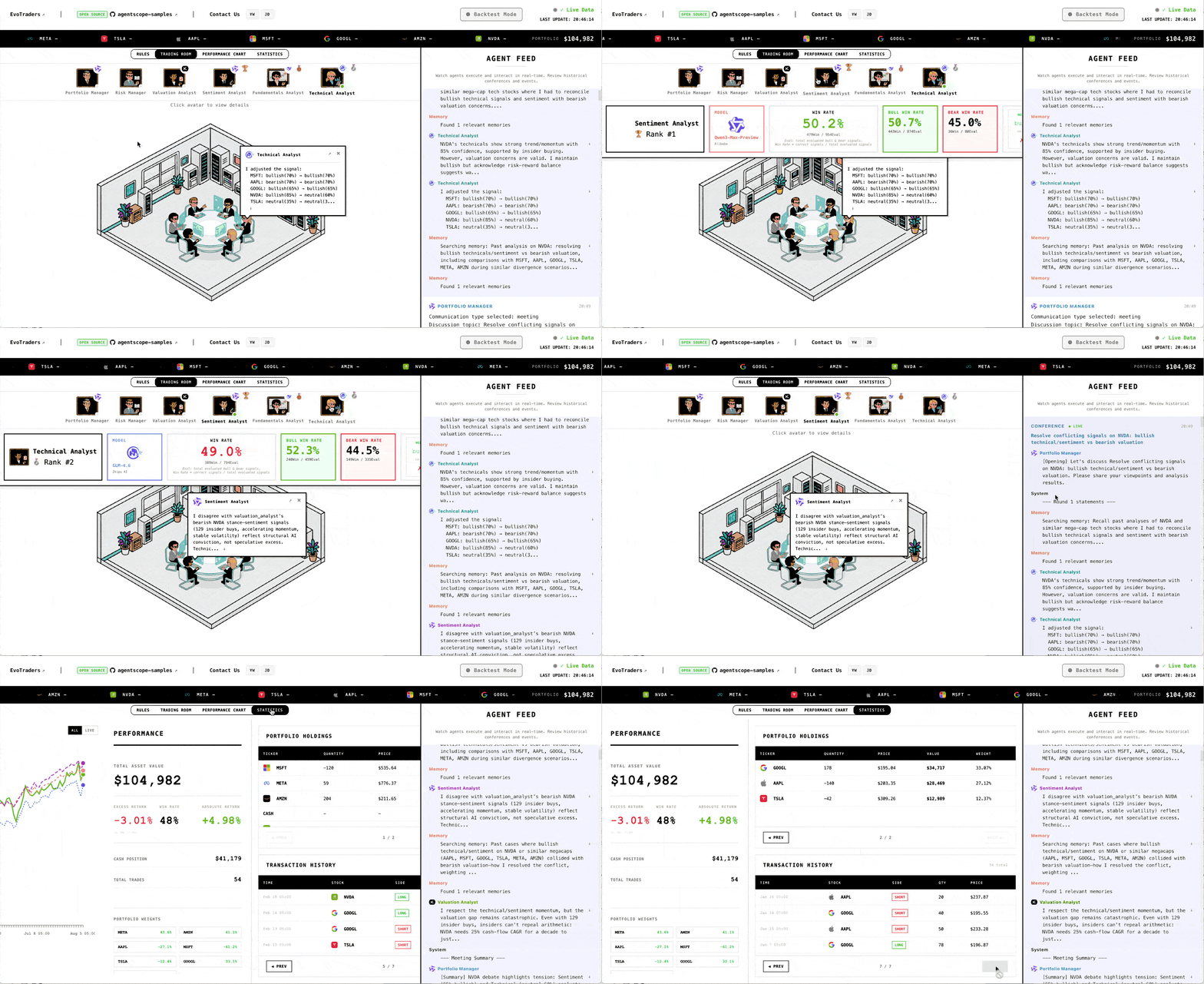
大时代 is an open-source financial trading agent framework that combines multi-agent collaboration, run-scoped workspaces, and memory to support both backtests and live trading workflows.
The repository name and CLI entrypoints still use `evotraders` for compatibility, but the product-facing branding now follows the 大时代 naming used by the reference branch.
---
## Core Features
**Multi-agent trading team**
Six roles collaborate like a real desk: four specialist analysts (fundamentals, technical, sentiment, valuation), one portfolio manager, and one risk manager.
**Continuous learning**
Agents can persist long-term memory with ReMe, reflect after each cycle, and evolve their decision patterns over time.
**Backtest and live modes**
The same runtime model supports historical simulation and live execution with real-time market data.
**Operator-facing UI**
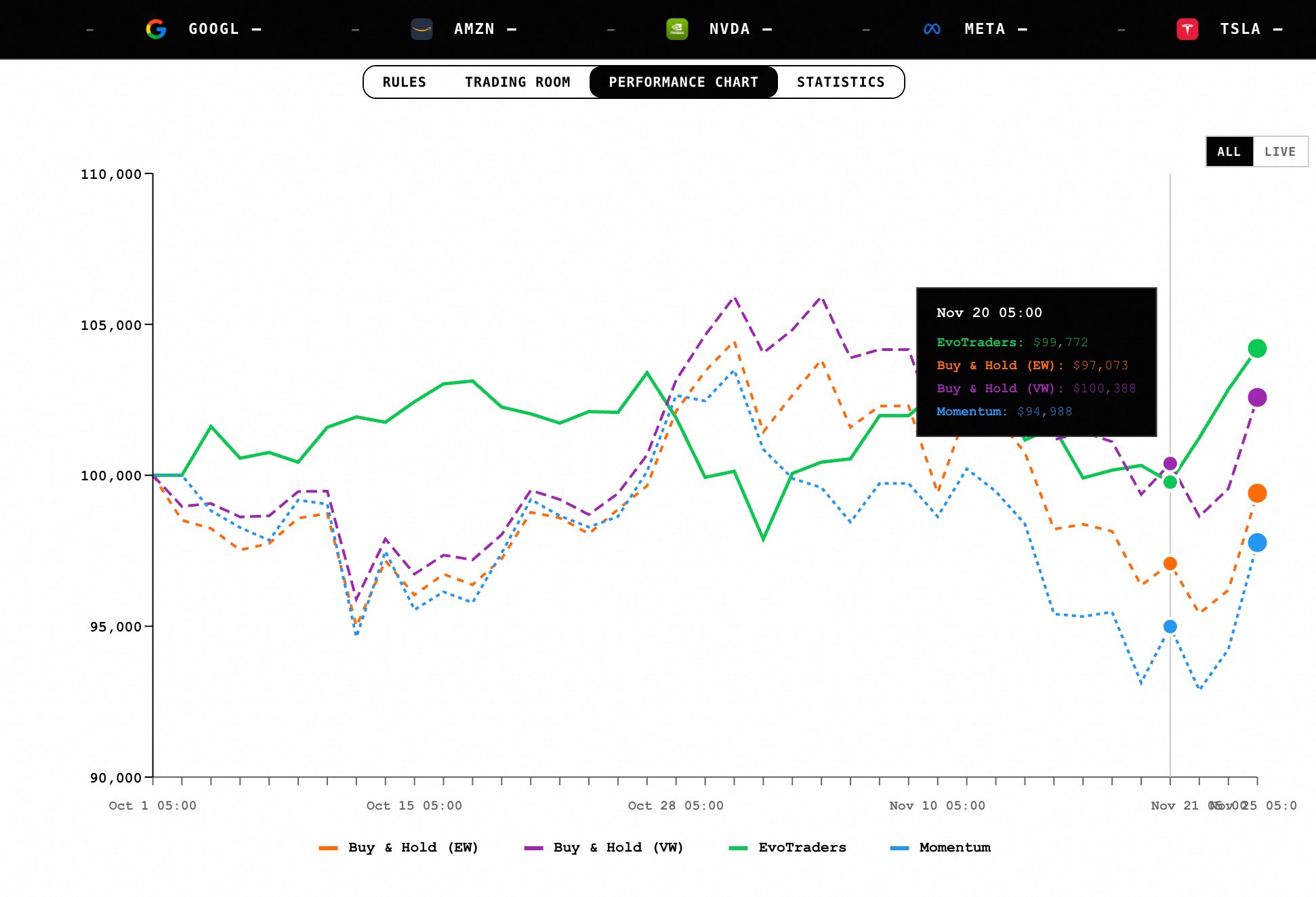
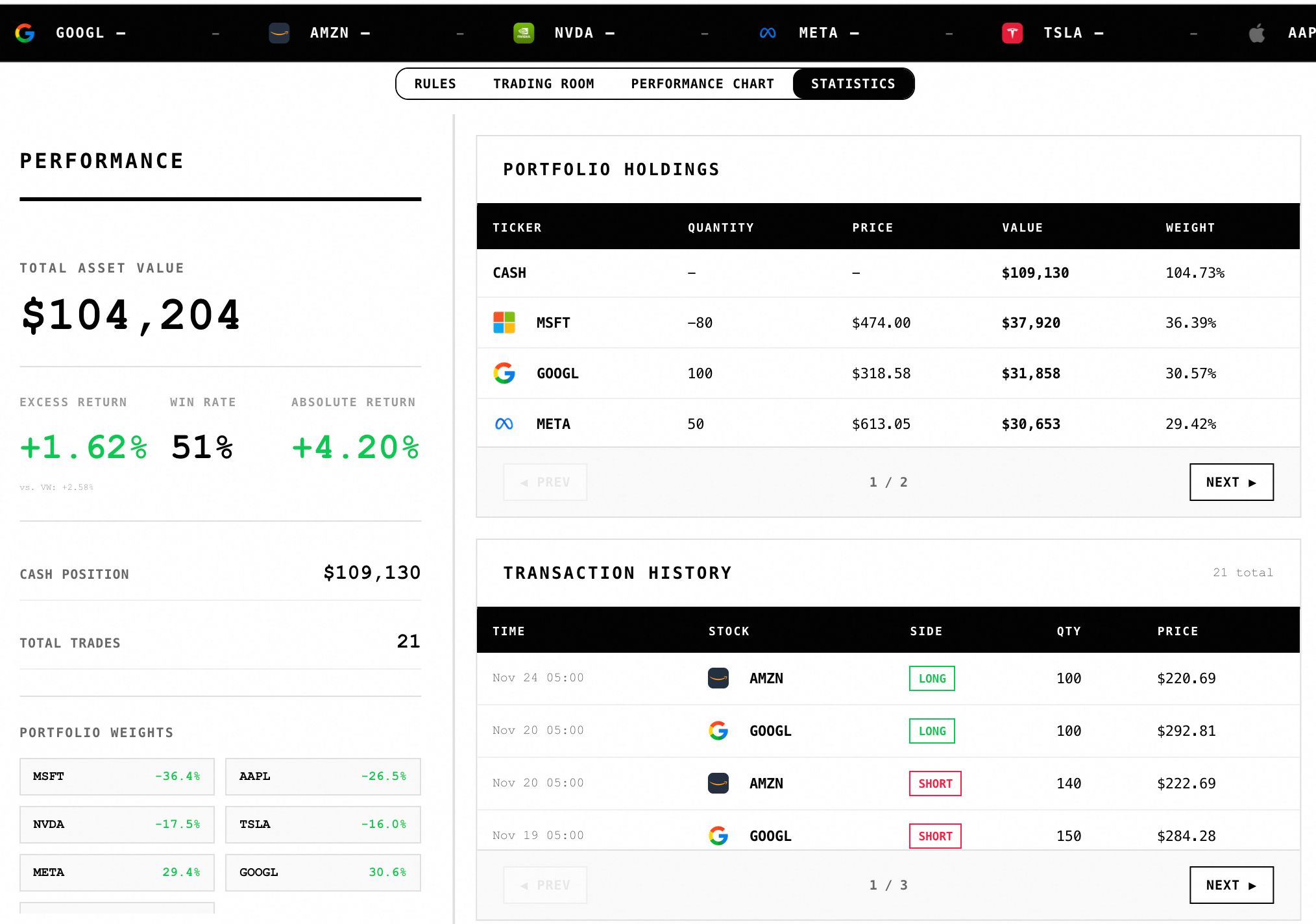
The frontend exposes the trading room, runtime controls, logs, approvals, agent workspaces, and explain/news views.
---
## Current Architecture
The repository is currently in a transition from a modular monolith to split service surfaces. The split-service path is the default local development mode.
Current app surfaces:
- `backend.apps.agent_service` on `:8000`: control plane for workspaces, agents, skills, and guard/approval APIs
- `backend.apps.trading_service` on `:8001`: read-only trading data APIs
- `backend.apps.news_service` on `:8002`: read-only explain/news APIs
- `backend.apps.runtime_service` on `:8003`: runtime lifecycle APIs
- `backend.apps.openclaw_service` on `:8004`: read-only OpenClaw facade
- WebSocket gateway on `:8765`: live event/feed channel for the frontend
The most important runtime path today is:
`frontend -> runtime_service/control APIs -> gateway/runtime manager -> market service + pipeline + storage`
Reference notes for the migration live in [services/README.md](./services/README.md).
---
## Quick Start
### 1. Install
```bash
# clone this repository, then:
cd evotraders
# backend runtime dependencies
uv pip install -r requirements.txt
# install package entrypoint in editable mode
uv pip install -e .
# optional
# uv pip install -e ".[dev]"
# pip install -e .
```
Frontend dependencies:
```bash
cd frontend
npm ci
cd ..
```
Production deployment should prefer `requirements.txt` for backend and `npm ci` for frontend so the pulled environment matches the checked-in lockfiles and version pins.
### 2. Configure environment
```bash
cp env.template .env
```
The root `env.template` is the canonical local template. A `.env.example` is also kept in the repo for reference.
Minimum useful variables:
```bash
# watchlist
TICKERS=AAPL,MSFT,GOOGL,NVDA,TSLA,META,AMZN
# market data
FIN_DATA_SOURCE=finnhub
FINANCIAL_DATASETS_API_KEY=
FINNHUB_API_KEY=
POLYGON_API_KEY=
# agent model
OPENAI_API_KEY=
OPENAI_BASE_URL=
MODEL_NAME=qwen3-max-preview
# memory (optional unless --enable-memory is used)
MEMORY_API_KEY=
```
Notes:
- `FINNHUB_API_KEY` is required for live mode.
- `POLYGON_API_KEY` enables long-lived market-store ingestion and refresh helpers.
- `MEMORY_API_KEY` is only required when long-term memory is enabled.
For a production-style local start flow, you can also use:
```bash
./start.sh
```
### 3. Start the stack
Recommended local development flow:
```bash
./start-dev.sh
```
This starts:
- `agent_service` at `http://localhost:8000`
- `trading_service` at `http://localhost:8001`
- `news_service` at `http://localhost:8002`
- `runtime_service` at `http://localhost:8003`
- gateway WebSocket at `ws://localhost:8765`
Then start the frontend in another terminal:
```bash
evotraders frontend
```
Open `http://localhost:5173`.
You can also run services manually:
```bash
python -m uvicorn backend.apps.agent_service:app --host 0.0.0.0 --port 8000 --reload
python -m uvicorn backend.apps.trading_service:app --host 0.0.0.0 --port 8001 --reload
python -m uvicorn backend.apps.news_service:app --host 0.0.0.0 --port 8002 --reload
python -m uvicorn backend.apps.runtime_service:app --host 0.0.0.0 --port 8003 --reload
python -m backend.main --mode live --host 0.0.0.0 --port 8765
```
### 4. Run backtest or live mode from CLI
Backtest:
```bash
evotraders backtest --start 2025-11-01 --end 2025-12-01
evotraders backtest --start 2025-11-01 --end 2025-12-01 --enable-memory
evotraders backtest --config-name smoke_fullstack --start 2025-11-01 --end 2025-12-01
```
Live:
```bash
evotraders live
evotraders live --enable-memory
evotraders live --schedule-mode intraday --interval-minutes 60
evotraders live --trigger-time 22:30
```
Help:
```bash
evotraders --help
evotraders backtest --help
evotraders live --help
evotraders frontend --help
```
### Offline backtest data
If you want a quick backtest demo without external market APIs, download the offline bundle and unzip it into `backend/data`:
```bash
wget "https://agentscope-open.oss-cn-beijing.aliyuncs.com/ret_data.zip"
unzip ret_data.zip -d backend/data
```
---
## Runtime Data Layout
- Long-lived research data lives in `data/market_research.db`
- Each run writes run-scoped state under `runs//`
- `runs//BOOTSTRAP.md` stores run-specific bootstrap values and prompt body
- `runs//state/runtime_state.json` stores runtime snapshot state
- `runs//team_dashboard/*.json` is a compatibility/export layer for dashboard consumers, not the primary runtime source of truth
Optional retention control:
```bash
RUNS_RETENTION_COUNT=20
```
Only timestamped run folders like `YYYYMMDD_HHMMSS` are pruned automatically. Named runs such as `live`, `smoke_fullstack`, or `reload_demo_*` are preserved.
---
## Frontend Service Routing
The frontend always uses the control plane and runtime APIs, and can optionally call split services directly for read-only data.
Useful frontend env vars:
```bash
VITE_CONTROL_API_BASE_URL=http://localhost:8000/api
VITE_RUNTIME_API_BASE_URL=http://localhost:8003/api/runtime
VITE_NEWS_SERVICE_URL=http://localhost:8002
VITE_TRADING_SERVICE_URL=http://localhost:8001
VITE_WS_URL=ws://localhost:8765
```
If these are not set, the frontend falls back to its local defaults and compatibility paths where available.
---
## Decision Flow
```text
Market data -> independent analyst work -> team communication -> portfolio decision ->
risk review -> execution/settlement -> reflection/memory update
```
The runtime manager also tracks:
- agent registration and status
- pending approvals
- run events
- current session key
---
## Custom Configuration
### Add or change analyst roles
1. Define the analyst persona in [backend/agents/prompts/analyst/personas.yaml](./backend/agents/prompts/analyst/personas.yaml)
2. Register the role in [backend/config/constants.py](./backend/config/constants.py)
3. Optionally add/update the frontend seat metadata in [frontend/src/config/constants.js](./frontend/src/config/constants.js)
Example persona entry:
```yaml
comprehensive_analyst:
name: "Comprehensive Analyst"
focus:
- multi-factor synthesis
preferred_tools:
- get_stock_price
- get_company_financials
description: |
A generalist analyst that combines multiple signals.
```
### Configure per-agent models
Model overrides are configured in `.env`:
```bash
AGENT_SENTIMENT_ANALYST_MODEL_NAME=deepseek-v3.2-exp
AGENT_TECHNICAL_ANALYST_MODEL_NAME=glm-4.6
AGENT_FUNDAMENTALS_ANALYST_MODEL_NAME=qwen3-max-preview
AGENT_VALUATION_ANALYST_MODEL_NAME=Moonshot-Kimi-K2-Instruct
AGENT_RISK_MANAGER_MODEL_NAME=qwen3-max-preview
AGENT_PORTFOLIO_MANAGER_MODEL_NAME=qwen3-max-preview
```
### Run-scoped bootstrap config
Each run can override defaults through `runs//BOOTSTRAP.md`. The front matter is parsed by [backend/config/bootstrap_config.py](./backend/config/bootstrap_config.py) and can define values such as:
```yaml
tickers:
- AAPL
- MSFT
initial_cash: 100000
margin_requirement: 0.5
max_comm_cycles: 2
schedule_mode: daily
trigger_time: "09:30"
enable_memory: false
```
Initialize a run workspace with:
```bash
evotraders init-workspace --config-name my_run
```
---
## Project Structure
```text
evotraders/
├── backend/
│ ├── agents/ # agent roles, prompts, skills, workspaces
│ ├── api/ # FastAPI routers
│ ├── apps/ # split service surfaces
│ ├── core/ # pipeline, scheduler, state sync
│ ├── runtime/ # runtime manager and agent runtime state
│ ├── services/ # gateway, market/storage/db services
│ └── cli.py # Typer CLI entrypoint
├── frontend/ # React + Vite UI
├── shared/ # shared clients and schemas for split services
├── runs/ # run-scoped state and dashboards
├── data/ # long-lived research artifacts
└── services/README.md
```
---
## Testing
Backend tests live under `backend/tests` and cover service apps, shared clients, domains, routing, enrichment, gateway support, and runtime support.
Typical commands:
```bash
pytest
pytest backend/tests/test_runtime_service_app.py
pytest backend/tests/test_trading_service_app.py
```
Frontend tests:
```bash
cd frontend
npm test
```
---
## License and Disclaimer
大时代 is a research and educational project. Review the repository license before redistribution or commercial use.
**Risk warning**: this project is not investment advice. Test thoroughly before any real-money deployment. Past performance does not guarantee future returns.